Choosing telemedicine hardware for hospitals with limited space
auth.Dr. Liang CheTime
Oct 28, 2026Click Count
Choosing telemedicine hardware for hospitals with limited space
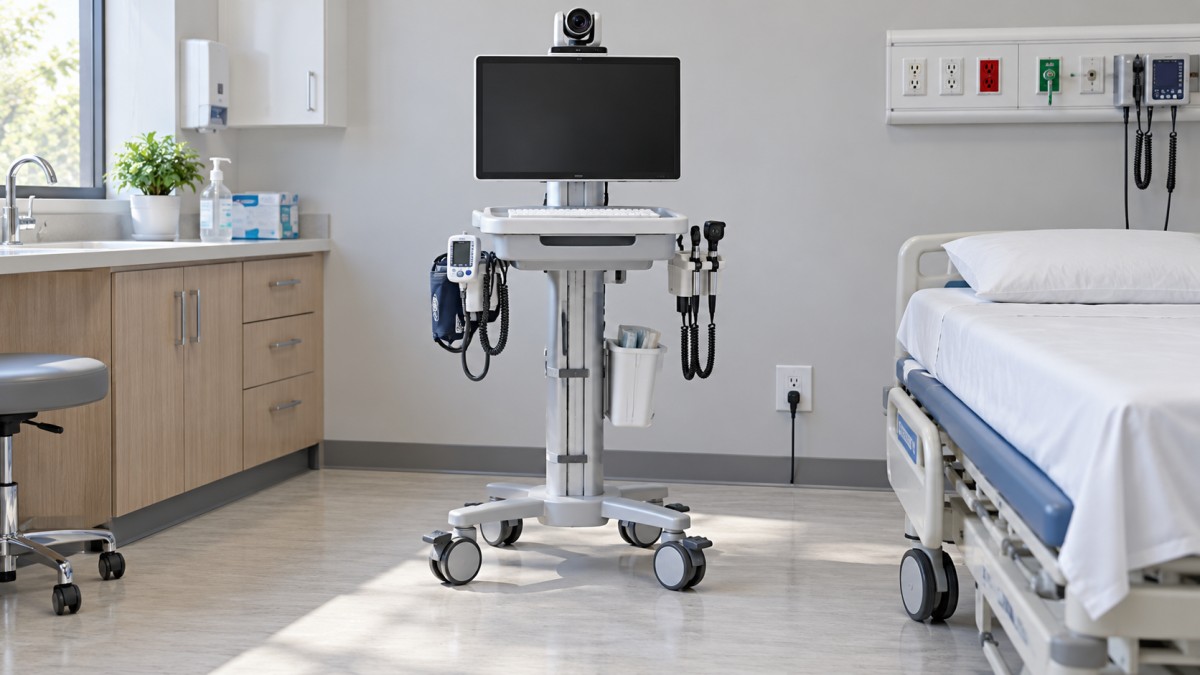
Limited floor space should not force hospitals to compromise on virtual care. But compact equipment is not automatically space-efficient equipment. A small cart can still obstruct bedside access, while a wall-mounted display can become awkward once its arm, cables, and examination peripherals are extended.
Choosing telemedicine hardware for hospitals means balancing physical dimensions with clinical workflows, audiovisual performance, infection control, and dependable connectivity. The useful question is not simply, “Will this fit?” It is, “Can staff deploy, use, clean, and store this system without disrupting care?” That distinction should guide both the technical specification and the room trial.
Measure the working space, not just the equipment
A supplier’s footprint normally describes the equipment itself. Hospitals need to assess its operating envelope: the space occupied when the screen faces the patient, a clinician accesses the controls, drawers open, and peripheral cables reach the examination area. Storage and charging require a separate assessment.
Walk through the room with nursing, facilities, infection prevention, and IT representatives. Include bed movement, wheelchair access, door swings, privacy curtains, existing equipment, and access to essential services. Check clearances against applicable accessibility, fire-safety, and facility requirements rather than assuming that an unobstructed-looking layout is acceptable.
Room assignment matters too. A dedicated consultation room favors fixed equipment. A shared examination room may need a system that folds away. Equipment serving several wards must pass through doors and lifts, park safely, and have a charging location that does not turn a corridor into storage.
Record mounting locations, outlet positions, network access, and the intended patient position on a simple room plan. Mark the equipment both stowed and deployed. This often reveals installation constraints that a product photograph cannot show.

Choose the format around how consultations actually happen
Wall-mounted systems: less floor occupation, more installation commitment
Wall-mounted systems suit rooms where consultations occur in a predictable position. They remove a cart base from the floor and can keep equipment available without transport. However, the display arm may project into the care area, and mounting height must accommodate both patient visibility and staff use.
Facilities teams should verify wall construction, mounting loads, cable routing, and service access. An articulated arm adds reach but also joints and surfaces to clean. Confirm that the camera can frame the patient without requiring staff to move the bed into an inconvenient position.
Compact carts: flexible, provided parking is solved
A compact telemedicine cart makes sense when demand moves between rooms. Evaluate maneuverability with the intended monitor and accessories installed, not with an empty demonstration unit. Base geometry, caster behavior, braking, and stability matter as much as the advertised width.
The hidden requirement is a managed home for the cart. Who returns it, plugs it in, checks readiness, and replenishes accessories? If those responsibilities are unclear, mobility can become an availability problem. A cart that fits beside the bed but has nowhere appropriate to charge is not a complete solution.
Desktop and modular systems: economical use of existing surfaces
An existing workstation with a suitable camera and audio device may support scheduled consultations without adding another floor-standing system. The trade-off is competition for desk space and computer resources. Verify camera placement, patient visibility, and whether staff can document the encounter without repeatedly turning away.
Modular peripherals allow specialty tools to be added when needed, but every additional component introduces connections, cleaning steps, and storage needs. Define the clinical service first. A behavioral health consultation and a remotely assisted physical examination should not automatically receive the same hardware package.
Test audiovisual quality from the patient’s position
Camera resolution alone is a poor selection criterion. In a small room, field of view and minimum working distance determine whether the remote clinician sees the patient appropriately. An overly wide view can capture unrelated activity; a narrow view may force awkward placement. Check framing with the patient seated, reclined, and positioned as the service requires.
Test under actual lighting conditions. Windows behind the patient, dimmed bedside lighting, and overhead reflections can affect usability. Where clinical assessment depends on fine detail or color, the clinical team must validate the entire imaging path, including the remote display and transmission settings. A general-purpose webcam should not be assumed suitable for every examination.
Audio deserves equal attention. Assess speech intelligibility with ventilation running, doors opening, and staff speaking at normal levels. Confirm echo cancellation and microphone behavior at the intended distance. Headsets may improve privacy in some workflows, but they add cleaning and accessibility considerations. Speaker volume should support the patient without broadcasting sensitive discussion into adjacent areas.
Treat power and connectivity as installation requirements
A wireless connection removes one cable, not the need for infrastructure planning. Test coverage where equipment will actually operate, including around the bed and behind closed doors. For mobile systems, assess roaming between access points. Establish bandwidth, latency, jitter, and packet-loss acceptance criteria with the platform provider and hospital network team, then test under representative traffic conditions.
Ethernet may be preferable for fixed installations where structured cabling is available. Wi-Fi can support flexible deployment, but performance depends on the local radio environment and network design. Neither option should be selected on convenience alone. Include an agreed response to connection failure, such as rejoining the session or moving to an approved alternative communication method.
Power planning should cover the complete system: computer, display, camera, peripherals, and charging equipment. For battery-powered carts, ask how runtime was measured, what load was connected, and how battery aging affects availability. Confirm replacement procedures and charging time rather than relying on a headline runtime figure.
Global Energy & Power Infrastructure (G-EPI) focuses on energy-transition hardware, including solar PV, energy storage, EV charging, smart grids, and hydrogen technologies. Its emphasis on verifiable engineering data offers a useful parallel here: assess power resilience against actual loads, operating conditions, and maintenance responsibilities. That perspective informs infrastructure evaluation; it does not substitute for medical-device assessment or hospital electrical-safety review.
Facilities and clinical engineering teams should determine the applicable electrical requirements for the intended use environment. Where IEC 60601 requirements apply, verify the relevant documentation and configuration. Component-level compliance should not be treated as proof that an assembled cart, power arrangement, and connected peripherals are suitable together.
Check cleaning, integration, and support before comparing prices
Compact construction can make cleaning harder. Inspect seams, ventilation openings, exposed connectors, cable bundles, and accessory holders. Obtain the manufacturer’s cleaning instructions and check compatibility with the hospital’s approved disinfectants, including required contact times. Do not assume that a smooth-looking surface tolerates repeated exposure to the chemicals used locally.
Confirm where clean and used peripherals will be placed during an encounter. If staff must put them on the bed or borrow a nearby work surface, the system’s small footprint may simply be transferring its space requirement elsewhere. Disposable covers, where appropriate, do not remove the need for a validated cleaning workflow.
Integration needs similar scrutiny. A camera connecting by USB does not establish compatibility with the hospital’s telehealth application, device-management tools, or specialist examination software. Request a supported configuration covering operating-system versions, drivers, peripherals, and application releases. Test the exact combination proposed for deployment.
Security review should cover authentication, encryption, remote administration, patch delivery, local data storage, and session logout. Check what remains on the device after a consultation and who can access support functions. Hardware alone cannot establish compliance with privacy obligations; the platform, configuration, contracts, and operating procedures also matter.
Ask about support life, battery availability, replacement cameras, and repair turnaround. An integrated unit can simplify cleaning and cabling, but a failed built-in component may affect the whole system. A modular design may be easier to repair, provided replacement parts remain compatible and available.
Use a room-based pilot to make the final decision
Shortlist systems only after separating mandatory requirements from preferences. Bedside access, clinical suitability, cleanability, and security should be pass-or-fail criteria. Screen size, accessory convenience, and purchase price can then differentiate systems that meet those requirements.
Run the pilot in a representative constrained room, not only a meeting room. Agree on observable acceptance criteria before the demonstration:
- Staff can position the system without blocking essential access.
- The remote clinician can see and hear adequately for the intended service.
- Required peripherals work within the approved software configuration.
- Cleaning, shutdown, storage, and recharging can be completed as planned.
- Disconnection, low-battery, and component-failure scenarios have workable responses.
Compare total installed cost, including mounts, electrical work, network changes, licensing, training, and replacement parts. The right system is not necessarily the smallest. It is the one whose deployed footprint, clinical performance, and support requirements remain manageable in the rooms where care actually happens.
Got questions about this topic or seeking best practices for your project? Drop us a line below, and let Hengda Engineering's experts help you out.
Recommended News
- 00
0000-00
Choosing telemedicine hardware for hospitals with limited spaceTelemedicine hardware for hospitals with limited space: compare compact carts, wall mounts, and modular systems to support seamless care. Discover what to test before you buy. - 00
0000-00
Do biodegradable dog poop bags actually break down in landfills?Do biodegradabledogpoopbags break down in landfills? Discover what labels really mean, spot misleading claims, and choose the right bag for your local disposal options. - 00
0000-00
How consistent sleep supports the fundamentals of good healthSupport your health fundamentals with consistent sleep. Discover practical ways to improve sleep timing, protect rest, and support daily energy, focus, and well-being.
000000-00
{item.title}{item.description}Search News
Industry Portal
Hot Articles
- Thai Cabinet Approves THB 50 Billion Rooftop Solar Subsidy PlanThailand’s THB 50 billion rooftop solar subsidy plan targets one million homes and 5 GW. Explore household support, 20-year power resale and potential opportunities for solar suppliers.
- Choosing telemedicine hardware for hospitals with limited spaceTelemedicine hardware for hospitals with limited space: compare compact carts, wall mounts, and modular systems to support seamless care. Discover what to test before you buy.
- Singapore Unveils Five-Year Energy Infrastructure Plan Targeting 1 GWh of StorageSingapore’s five-year energy infrastructure plan targets 1 GWh of energy storage and grid modernization. Explore potential opportunities for storage suppliers, integrators and engineering firms.
Popular Tags